Is Meta Muse safe? What video reviews miss on privacy
Is Meta Muse safe? We checked four video reviews against Meta's security paper: what the Secure VM protects, where ads and training still reach, and a Mac flaw.
Source-based. Written from the documents, reporting and reviews linked in the text. Nothing here was tested hands-on by The Ruling Desk. How we work
Is Meta Muse safe? Safer than the average chatbot you paste your life into, but not as private as some reviews suggest. Meta's own security paper says the Muse you can use today runs in an isolated cloud computer that Meta can still access to run the service, while the version that would lock Meta out is only planned. We compared four YouTube videos about Muse with what Meta has actually published, and the gap is mostly in the privacy claims.
Key takeaways
- Secure VM is not Confidential VM. Meta says the launched Secure VM keeps your agent isolated, but Meta can still reach its data "when necessary to support, secure or operate the service." The Confidential VM that would cryptographically block Meta is a future plan, not a launch feature.
- Ads and training still touch Muse, just less directly. Meta says your conversations and VM data don't go to its ad systems, but what Muse does on the web shows up as your activity and can indirectly shape ads. Your interactions train Meta's models after scrubbing unless you opt out.
- A real flaw already surfaced. On September 21, security researcher Patrick Wardle showed a hidden setting in Muse for Mac that let code on your computer hijack the agent. It was hot-fixed the next day, according to reports.
- No video measured reliability. The four videos are an explainer, a user's review, a creator's first-week tests we could only check through its chapter list, and a short supervised demo. None counts how often Muse gets tasks right.
- Two facts changed after the early reviews. As of September 24, Meta says Muse is available in the US, Canada and Mexico, and that Muse for Mac can now control apps on your computer with your permission.
What Meta Muse does, in plain terms
Muse is Meta's personal AI agent: an assistant that carries out tasks instead of only answering questions. According to Meta's launch announcement on September 8, it remembers your preferences, turns goals into plans, can "open a browser, fill out forms, and negotiate" for you, and keeps working after you close the app, checking back when it needs your approval. It launched in the US on iOS, Android and the web, "free for most of what people need, with subscription plans for people who want to do more." Meta has not published those plans' prices.
The reviews agree on the shape of it. In Tool Finder's walkthrough, the presenter tours the Goals, Feed, Ideas and Artifacts tabs and notes that approvals can be granted once or set to always allow (at 4:44). Creator Alex Finn builds his review around what he calls the "god thread", one ongoing conversation where most requests go, plus a chapter on Instagram and Facebook integration.
Two caveats on those examples. Tool Finder's presenter says at 3:59 that Muse wasn't available to him in the UK and that he watched a full tour instead, so his video explains the product rather than testing it. And we couldn't retrieve Finn's captions, so his specifics come from his own chapter list and two caption-based summaries by OpenClawDatabase and Pogovet. Both report that he booked a movie ticket in seconds, found the free usage generous and sees Muse as best for errands such as reservations, tickets, email and calendar checks.
Is Meta Muse safe? What the Secure VM protects
Meta's answer is in a long technical post, How We Built Safety Into Muse, published September 8 by Tarek Sheasha of Meta Superintelligence Labs. Its main protections, as Meta describes them:
- An isolated computer per user. Your agent runs in its own virtual machine (VM), which Meta calls "the system of record for everything you put in Muse."
- A gatekeeper called Sentinel. Meta says Sentinel is "the sole permission authority" for actions in connected services and for all network traffic leaving the VM. It allows, blocks or asks you.
- Credentials the agent never sees. Your logins are stored in your VM, and the agent works with stand-in tokens. Sentinel swaps in the real ones only at the network boundary.
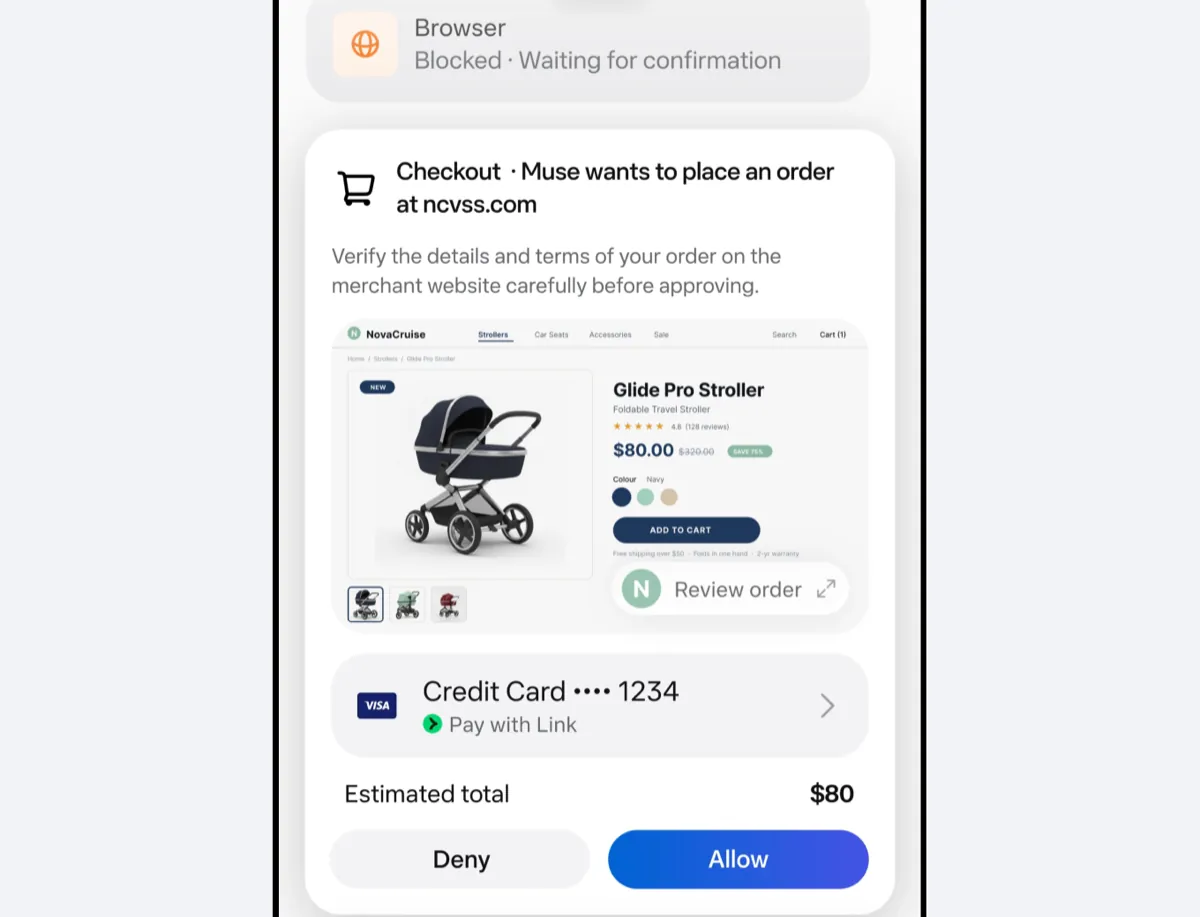
- Checkout approvals. Buying something triggers a mandatory approval showing the exact details, and payments use single-use card numbers, through Stripe Link or Shop Pay, tied to one merchant, amount and time window.
- Controls you can check. You can inspect, edit and download what Muse stores, including its memory about you. Meta's help center adds a "forget" command for a person or topic and a full reset that deletes all your Muse data.
That is a more careful design than the shorthand in most videos. It is also Meta describing its own system: nobody outside Meta had published an independent audit of it as of September 24, and the paper itself says "prompt injection remains an open problem in the industry, and Muse will sometimes make mistakes." Prompt injection means instructions hidden in a web page or email that trick an agent into doing something you didn't ask for.
Secure VM vs Confidential VM
This is the claim to watch. Meta's paper separates two things. The Secure VM you get today restricts Meta staff by policy, but Meta can access your data "when necessary to support, secure or operate the service." The Confidential VM is described as coming later, designed to "cryptographically and verifiably prevent Meta from accessing data in your VM," with external audits.
Tool Finder's video blurs the two. At about 1:01, the presenter says Muse's dedicated computer "is also known as confidential VM" and relays a comparison, which he attributes to Mark Zuckerberg, with WhatsApp's end-to-end encryption, where Meta can't read your messages. That describes the planned version, not the one you'd be using now.
Ads and AI training
Meta's launch post says Muse "doesn't share a person's conversations or the data in their VM with Meta's ad systems." The security paper adds the fine print: when Muse browses, shops or books for you, sites see that as your activity, and merchants' own tracking can then indirectly influence the ads you see.
That matters for how you read the tabGeeks video, whose chapter list includes "Your Data Never Feeds Meta's Ads". Its description also cites a "6-layer security architecture" and "Signal encryption protocols"; Meta's security paper mentions neither. On training, Meta says your interactions are "sanitized to remove key personally identifiable information" before they're used to train its models, and you can switch that off in settings. The help center says the switch also covers past interactions.
The Mac flaw found days after launch
On September 21, Mac security researcher Patrick Wardle disclosed a flaw in the Muse app for Mac. The Hacker News reports that an undocumented setting controlled where Muse sent your dictation, and any program running under your account could change it without extra permissions. An attacker could then read what you dictated, inject instructions Muse would follow and capture your login token.
The catch was that the attacker needed code already running on your Mac. Wardle argued a "ClickFix" lure, a fake prompt that tricks you into pasting a command into Terminal, could provide that without any malware. Unite.AI reports that Wardle confirmed a hot-fix on September 22. The Hacker News noted Meta had not published a security advisory, and none of the coverage we read reported attacks in the wild.
Here's our inference, not Meta's: the Mac app now matters more. Finn's September 19 complaint was that Muse ran only in its own cloud computer, not on your machine. Meta's Connect recap, published in German on September 24, now says that "with appropriate permission, Muse can control any app on the Mac." That fixes Finn's limitation, and it also widens what a compromised Mac app could reach.
How much to trust each video
Each Meta Muse review below is a different kind of evidence, and it helps to keep them apart.
| Video | Date and length | What it is | How much weight it carries |
|---|---|---|---|
| tabGeeks: What The Hell Is Meta Muse? | Sept 24, 14:21 | First-week tests, per its description | Low for us: we could only check its description and chapters. They claim it planned a Houston trip and called dentists |
| Alex Finn: Meta Muse is an INCREDIBLE AI agent | Sept 19, 24:09 | A heavy AI user's review | Medium: real use, one person's opinion, reconstructed from chapters and summaries |
| Tool Finder: Meta Muse: Explained | Sept 11, 7:24 | Explainer, sponsored by Granola, with affiliate links disclosed | Low on privacy: mixes up the two VMs |
| CNET: Hands-On With Meta VR Glasses | Sept 24, 11:28 | Short, supervised event demo | Medium for what Stein saw, low for daily reliability |
None of them measures how often Muse completes a booking, purchase or call correctly, how many approvals it takes, or how much time it saves. Finn's own conclusion, as both summaries describe it, is a fair one: Muse can be a good product without being the right one for you. He keeps other agents for technical work.
Muse on glasses: what the first demo showed
Meta's glasses announcement says Muse is coming to its AI glasses to help "all hands free," and the Connect recap puts that "in the coming months." CNET's Scott Stein tried an early version at about 2:23, set up in advance with a bodybuilder's nutrition and workout data.
In the clip, Muse picks between two snacks using the day's logged targets, offers to log the choice and works through moving his workouts. It also stalls several times with "one sec" and "one moment" replies, and at one point someone in the room remarks that something "was not showing up on the app." It's a glimpse of a hands-free agent, not proof it works reliably in daily life.
The same video covers the new hardware, which we detail in our Meta Connect 2026 roundup. One number to flag: Stein says the $1,299.99 VR Glasses have an 84-degree field of view, a figure Meta's VR Glasses announcement doesn't state.
What it means for you
If you're in the US, Canada or Mexico and thinking of trying Muse, a good part of Meta Muse privacy comes down to your own settings:
- Connect only what the task needs. Meta's controls work per connector, so a trip planner doesn't need your work email.
- Keep approvals on "once" for anything that spends money or sends messages, at least until you've seen how it behaves. "Always allow" skips the step Meta built to catch mistakes.
- Decide on training. If you don't want your Muse sessions used to train Meta's models, turn it off in settings; Meta says the change also applies to past interactions.
- Update the Mac app before you grant it computer control, and be wary of any web page telling you to paste a command into Terminal.
For more on how agents are changing, browse our AI coverage and the AI agents tag.
Bottom line
So is Meta Muse safe? It has a more detailed security design than most consumer AI apps, and Meta is upfront in its own paper about the limits. But the most reassuring claims in the videos go further than Meta does: today's Secure VM is not the Confidential VM, "not shared with ad systems" is not "no effect on ads," and training is on until you turn it off. Try it for errands where a mistake is cheap, keep approvals tight, and watch for two things: when the Confidential VM ships, and whether anyone publishes independent tests of how often Muse gets real tasks right.
FAQ
Can Meta see my Muse data?
Yes, in limited cases. Meta's security paper says the current Secure VM restricts access by policy, but Meta can reach your data when needed to support, secure or operate the service. The planned Confidential VM is designed to block that cryptographically, and Meta hasn't said when it will ship.
Does Meta use Muse for ads?
Meta says your Muse conversations and VM data aren't shared with its ad systems. But what Muse does on other websites looks like your activity, and Meta acknowledges that can indirectly influence the ads you see.
Is Meta Muse free?
Meta says Muse is free for most of what people need, with subscription plans for heavier use. It hasn't published plan prices or the free usage limits as of September 24, 2026.
Where is Meta Muse available?
Muse launched in the US on September 8 on iOS, Android and the web. Meta's Connect recap says it's now available in the US, Canada and Mexico, with more markets coming soon.