Windows 11 26H2: what changes and how to get it now
Windows 11 26H2 is a small enablement update: few visible changes, a fresh support clock, and no path for 26H1 PCs. Who gets it, how, and when to wait.
Source-based. Written from the documents, reporting and reviews linked in the text. Nothing here was tested hands-on by The Ruling Desk. How we work

Windows 11 26H2, which Microsoft calls the Windows 11 2026 Update, started rolling out on September 29, 2026, and for most PCs it is a small download and one restart. It turns on features that already reached your PC through monthly updates, so you'll see few changes. What you do get is a new support window. This guide explains what changes, which PCs can install it today, which ones can't, and how to get it or when to wait.
Key takeaways
- 26H2 is an enablement package for PCs on Windows 11 24H2 or 25H2: Microsoft says it installs like a monthly update, with a small download and a single restart.
- Visible changes are small. The features arrived through monthly updates over the past year; 26H2 switches some on and bundles the rest.
- Installing it resets support: 24 months for Home and Pro (to October 10, 2028) and 36 months for Enterprise and Education (to October 9, 2029), per Microsoft.
- Windows 11 24H2 Home and Pro stop getting updates on October 13, 2026. If that's your version, this is the update to take.
- PCs that shipped with version 26H1 (so far, Snapdragon X2 laptops) can't move to 26H2. Microsoft only promises them a path in "a future Windows release."
What Windows 11 26H2 actually changes
Not much you'll notice, and that's by design. Microsoft's IT pro guide to version 26H2 explains that 24H2, 25H2 and 26H2 share one servicing branch and one code base. New features have been shipping to all three through monthly cumulative updates, "with some functionality remaining dormant until activated by the version 26H2 enablement package." An enablement package is that switch: a small update that turns on code already sitting on your PC.
Microsoft lists three things the update turns on by default that were previously held back on work PCs under temporary commercial controls:
- Windows settings backup, which saves supported settings and your Microsoft Store app list for recovery or a new PC.
- App-specific actions from the taskbar.
- File Explorer improvements to navigation and usability.
The rest of what Microsoft counts as new in 26H2 landed during the year. Its what's new page for 26H2 lists, among others:
- a redesigned Start menu with a scrollable All section, category and grid views, and size options;
- a taskbar you can move to the top, left or right, plus a smaller taskbar option;
- Windows Search that previews results and handles typos in app names better;
- File Explorer support for more archive formats (
uu,cpio,xarandnupkg); - NPU columns in Task Manager, so you can see what uses the AI chip on PCs that have one;
- Smart App Control that you can turn on or off without reinstalling Windows;
- point-in-time restore, which rolls a PC back to a recent automatic restore point;
- voice access in Spanish, French, German and Korean.
One thing goes away: the WMIC command-line tool is removed, as it already was from 24H2 onward. If you've installed every monthly update, most of the list above is probably on your PC already.
Windows 11 26H2 support end dates
The practical reason to install 26H2 is the calendar. Each annual version gets a fixed support window, and installing the new one restarts it. These are the end-of-updates dates on Microsoft's Windows 11 release information page, as of September 30, 2026:
| Version | Home and Pro: updates end | Enterprise and Education: updates end |
|---|---|---|
| 26H2 (new) | October 10, 2028 | October 9, 2029 |
| 26H1 | March 14, 2028 | March 13, 2029 |
| 25H2 | October 12, 2027 | October 10, 2028 |
| 24H2 | October 13, 2026 | October 12, 2027 |
| 23H2 | Already ended | November 10, 2026 |
The row to look at is 24H2. The 24H2 end of support for Home and Pro comes two weeks after 26H2's release, on the same day as October's monthly security update. A PC left on 24H2 Home or Pro after that stops getting security fixes. On 25H2 you have another year, but moving now buys you a full year more.
Who can get it: 24H2, 25H2, 26H1 and older PCs
Microsoft's announcement of the 2026 Update offers Windows 11 26H2 to PCs on 24H2 and 25H2. Here's where each version stands:
- 24H2 and 25H2: you get the enablement package through Windows Update, as the rollout reaches you.
- 26H1: no. In February, Microsoft's explainer on version 26H1 called it a scoped release for "new devices with select new silicon," naming PCs with Qualcomm Snapdragon X2 Series processors. It's built on "a different Windows core" than 24H2, 25H2 and 26H2, so those PCs can't take this year's feature update and "will have a path to update in a future Windows release." Microsoft hasn't said which release. Meanwhile they keep getting monthly security and feature updates, and 26H1 itself is supported until March 2028 on Home and Pro.
- 23H2 and older: the enablement package isn't for you. Microsoft's Windows 11 download page now offers the 2026 Update, version 26H2, through the Installation Assistant, which runs on Windows 10 version 2004 or later with a valid license and 9 GB of free space. That's a full upgrade, not a quick switch.
As BleepingComputer's rundown puts it, users who keep their PCs current probably won't see big changes, and 26H1 machines are left out for now.
Step 1: Check which version you have
Open Settings, then System, then About, and look under Windows specifications for the Version line. You can also press Windows key + R, type winver and press Enter.
- If it says 24H2 or 25H2, go to step 2.
- If it says 26H1, stop here: 26H2 isn't offered to your PC.
- If it says 23H2 or older, skip to the Installation Assistant section below.
Step 2: Turn on early updates
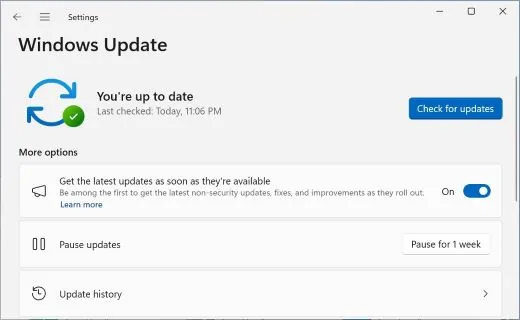
In Settings, open Windows Update and turn on Get the latest updates as soon as they're available. Microsoft's release health page says that on launch day, 26H2 is offered to eligible 24H2 and 25H2 PCs whose owners turned this setting on. Without it, you wait for the phased rollout, which Microsoft says "will expand over the next few months."
Step 3: Check for updates and restart
Click Check for updates. If 26H2 is ready for your PC, Microsoft says it downloads and installs automatically and "a single restart will complete the process." After the restart, check the version again: it should say 26H2. Microsoft's release information lists build 26300.9550 as the latest for 26H2, from September 29.
If nothing shows up, your PC may not be in the rollout yet or may be on a safeguard hold (see Troubleshooting).
Other ways to install it
The Windows 11 download page lists three tools, all for x64 PCs:
- Installation Assistant: upgrades the Windows you have in place. Microsoft says it doesn't run on Arm-based PCs.
- Media Creation Tool: makes a bootable USB drive for a clean install.
- Disk image (ISO): for bootable media or virtual machines. Arm versions are listed separately.
For a 24H2 or 25H2 PC, Windows Update is the lighter route: the enablement package is small, while these tools install the whole system. Use them when Windows Update has nothing for you and you have a reason not to wait, or when you're on 23H2 or older.
Should you wait?
Microsoft calls this a "controlled feature rollout" and may hold the update back from PCs with known compatibility issues. That hold is a safeguard, and it's a good reason not to force the update with the tools above if Windows Update isn't offering it to you.
Microsoft's known issues page for 26H2 listed three problems on September 29, all marked mitigated:
- some USB Audio Class 1.0 devices fail to start (Code 10 in Device Manager) or produce no sound;
- some work PCs joined to an on-premises domain with Credential Guard protected machine accounts lose their trust relationship with the domain;
- a black screen or missing desktop after sign-in, seen mainly on Azure Virtual Desktop hosts using FSLogix.
Only the first is likely to touch a home PC. The other two affect managed work PCs and virtual desktops, which IT departments handle. If you use a USB microphone, headset or audio interface, check that page before updating, or wait for Windows Update to offer 26H2 on its own.
Troubleshooting
- 26H2 doesn't appear. Check that early updates are on, that you're on 24H2 or 25H2, and that pending monthly updates are installed. A PC under a safeguard hold won't get the offer until Microsoft lifts it.
- You're on a Snapdragon X2 laptop. It runs 26H1 and can't install 26H2. That's expected, not a fault; it keeps getting monthly updates.
- The Installation Assistant won't run. It doesn't run on Arm-based PCs, per Microsoft, and needs 9 GB of free space.
- USB audio stopped working after the update. It matches a known issue Microsoft marks as mitigated; check the known issues page for the current status.
- A work PC can't sign in to the domain. That's the Credential Guard issue; Microsoft's page gives your IT team the workaround.
Bottom line
If your PC runs Windows 11 24H2 Home or Pro, install Windows 11 26H2 soon: updates for 24H2 end on October 13, 2026, and this is the quick way off it. On 25H2 there's no rush, but it's a small update that adds a year of support. If Windows Update doesn't offer it yet, waiting costs you little, since the features are mostly already there. Snapdragon X2 owners on 26H1 have nothing to do: watch for Microsoft to say which future release gives them a path. For more Windows coverage, see our software section and the Windows 11 tag.
FAQ
Is Windows 11 26H2 a big update?
No. Microsoft delivers it as an enablement package that turns on features already shipped through monthly updates, so it's a small download and one restart on 24H2 and 25H2. Most of what's new, like the redesigned Start menu, arrived during the year.
How long is Windows 11 26H2 supported?
24 months for Home and Pro, until October 10, 2028, and 36 months for Enterprise and Education, until October 9, 2029, according to Microsoft's release information.
Can a Snapdragon X2 PC get Windows 11 26H2?
Not now. Those PCs ship with version 26H1, which Microsoft says is built on a different Windows core and can't update to this year's feature update. Microsoft says they'll get a path in a future release but hasn't said which one.
Is it safe to install Windows 11 26H2 now?
Microsoft rolls it out in phases and holds it back from PCs with known compatibility problems. If Windows Update offers it, your PC has passed those checks. As of September 29, the three known issues Microsoft listed were marked mitigated.