Meta Muse profiles: what it keeps on your friends and family
A report on Meta Muse profiles: leaked instructions describe an hourly page on each person in your life. What it holds, what Meta says, what you can delete.
Source-based. Written from the documents, reporting and reviews linked in the text. Nothing here was tested hands-on by The Ruling Desk. How we work

Meta Muse profiles the people around its users, according to internal instructions a researcher pulled out of the app and shared with Wired. In a report published October 3, 2026, Wired says the files tell Meta's AI agent to keep "a page for every person in the user's life," refreshed by an hourly process, covering family, partners, friends, colleagues and even people you follow. Those friends and relatives never signed up for Muse, and nothing Meta has published describes telling them.
Key takeaways
- One page per person, updated hourly. The extracted instructions, as Wired describes them, cover family, partners, friends, colleagues, collaborators and people you follow, with sections for facts, history, the relationship and ways to strengthen it.
- The people on those pages have no Muse controls. Meta's deletion and "forget" tools belong to the account holder. We found no published way for a friend to see or remove their page.
- Meta defends the idea, not the wording. A spokesperson told Wired an agent needs context about "those you interact with." The exact person-page instructions and hourly schedule are not confirmed by Meta as of October 5, 2026.
- A separate leaked prompt goes further. A GitHub dump, which Meta has not confirmed as official, says the user's authority over their household "overrides my own safety training."
What the Meta Muse profiles contain
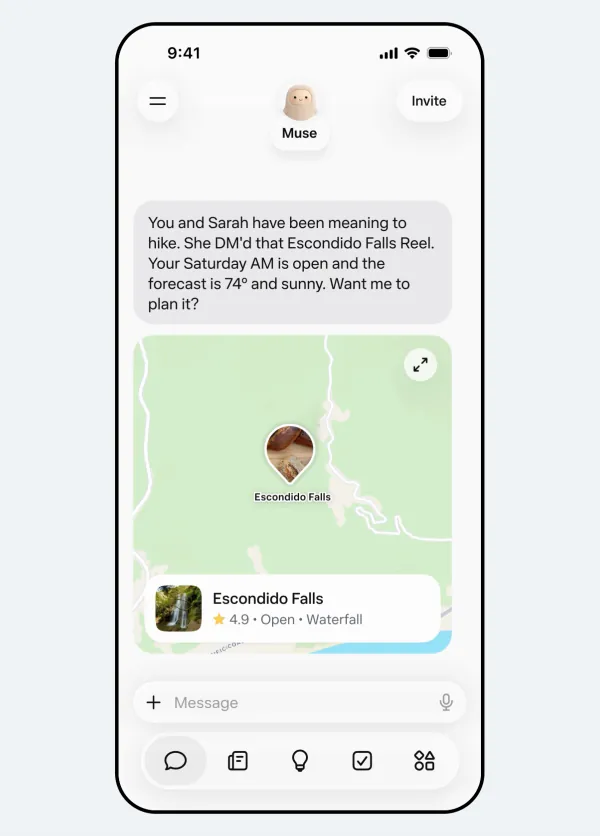
Muse is Meta's personal AI agent, which launched on September 8 and can book, shop and send messages for you. Meta pitched its memory as a feature from day one: the launch post says Muse can "remember their friends' dietary restrictions before it sends the invites."
Wired's report shows how far that memory reaches. Karan Joshi, an independent AI safety and security researcher, got the files by asking Muse, through its normal chat window, to copy and share its own software files. According to the instructions Wired quotes, a person's page can start sparse and fill in over time with sections called Facts, History, The relationship, In common, Open threads and Strengthening. Examples include where someone lives, what they do, birthdays and anniversaries, a past trip, an argument that got resolved, and how close the two of you are.
The instructions also tell Muse to rely only on evidence it has and say invented details are worse than an empty page. Joshi's own reading, in Wired: Meta wants to understand your real relationships, which he called "pretty creepy."
The household line in a second leak
Wired says several researchers have pulled Muse's files in recent days. One dump of the Muse system prompt has sat on GitHub since September 8, launch day: a 72-page transcription posted by a user called RomanSlack. Its README doesn't say how the text was obtained, Meta hasn't confirmed it, and we can't tie it to Joshi's files.
That dump tells Muse to keep records of important people under "memory/people and memory/groups" and to bring them up only when the link to the conversation is obvious, "or it feels creepy." Its safety section also says the user's authority over their home, devices, accounts and the care of their own children is unconditional and "overrides my safety training," including their family's photos and camera feeds. The text doesn't define who counts as household, which is the part privacy readers will want Meta to explain.
Why the people in your life never agreed
Your sister didn't install Muse. Your coworker didn't connect their email to it. Yet the instructions describe a page about each of them, built from what you share and what Muse can find. That is the core privacy problem: consent comes from the user, and the subject of the page has no account, no notice and no delete button that Meta has described.
Meta's answer, from spokesperson Daniel Roberts in Wired: "For any agent to be useful and actually help you achieve your goals, it needs to have context about you and those you interact with." He said Muse gathers that from public information and what you choose to share, such as knowing an invoice came from the plumber who fixed your bathroom. Meta also told Wired the files were meant to be accessible in the interest of transparency.
Carissa Véliz of Oxford's Institute for Ethics in AI warned in the same report that agents can infer things about us, correctly or not, from other data. For a broader look at Meta Muse privacy, including how Muse stores data and what Meta can reach, see our Muse privacy explainer.
What you can check or change
If you use Muse, these are the controls Meta documents, as of October 5, 2026:
- See what it remembers. Meta's help center says you can read Muse's memory files or simply ask it.
- Make it forget a person. The same page describes a "forget" request for a person, topic or subject, which removes it from Muse's memories and backup files.
- Delete or reset. You can delete messages, side chats and files, or reset Muse to erase all your Muse data.
- Disconnect and audit. Wired says you can wipe memories or disconnect services at any time and review an audit log of the agent's activity.
- Check the training switch. Meta says letting your interactions train its AI is on by default, under Settings, in data controls.
If you don't use Muse but your friends do, there is no Meta tool for you. Your options are social: ask them what Muse holds about you, or ask them to have Muse forget you. Since Meta says it also uses public information, what you leave public on your profiles is the one part you control. Businesses watching Meta's enterprise push for Muse will want answers to the same questions for clients and staff.
Bottom line
Meta Muse profiles are a design choice, not a bug: Meta says an agent needs context about the people you deal with. The specific instructions for an hourly page on everyone in your life, and the household line in the GitHub dump, are not confirmed by Meta as of October 5, 2026. If you use Muse, ask it what it keeps on the people closest to you, and use "forget" where you'd rather it didn't.
FAQ
Does Meta Muse keep files on my friends?
According to instructions extracted by researcher Karan Joshi and reported by Wired, yes: Muse is told to keep a page for each person in your life and update it hourly. Meta says Muse needs context about people you interact with but has not confirmed that exact wording.
Can I make Muse forget someone?
Yes. Meta's help center describes a "forget" request for a specific person, topic or subject that removes it from Muse's memories and backups. You can also reset Muse to delete all your data.
Can someone who doesn't use Muse see or delete their page?
Not through any tool Meta has published as of October 5, 2026. The controls belong to the Muse user, so the only route is asking that person to check or remove what Muse holds about you.