SynthID Detector is now public: how to check a file
Google's SynthID Detector now checks any image, video or audio file for its AI watermark. How synthid.com works, what results mean and what it can't see.
Source-based. Written from the documents, reporting and reviews linked in the text. Nothing here was tested hands-on by The Ruling Desk. How we work
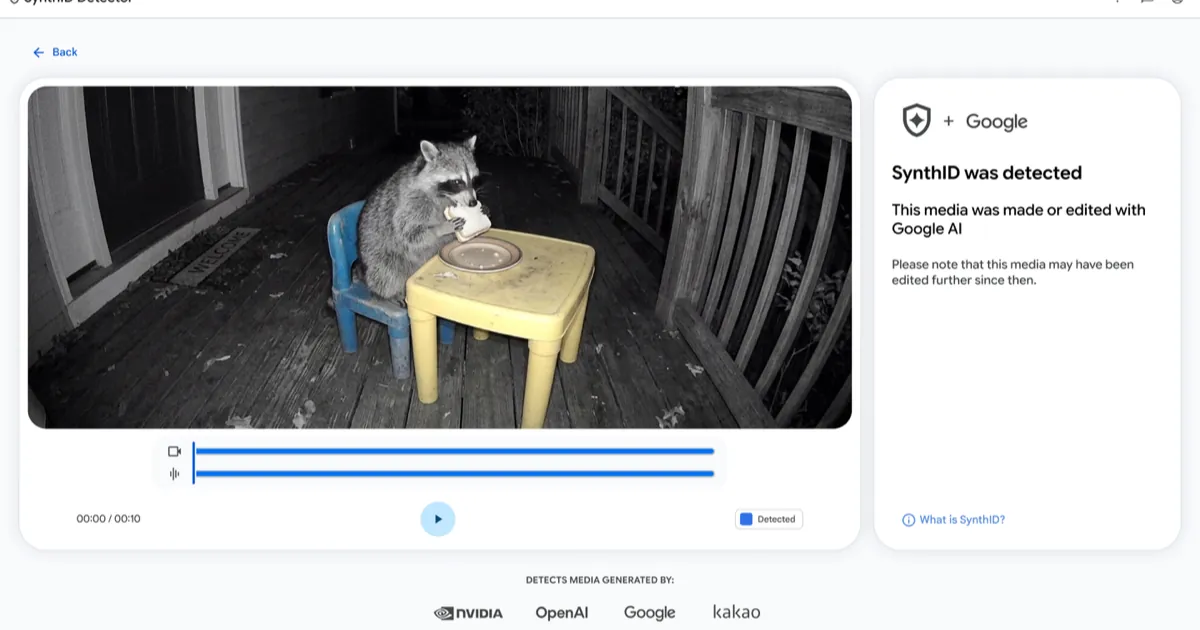
Google's SynthID Detector is now open to everyone, so anyone can upload an image, video or audio file and check it for the invisible watermark that Google and a few partners put in AI-generated media. Google announced the change on October 7, 2026, a year after an early version went to journalists and researchers. Here is how a check works, step by step as Google and early coverage describe it, what each result means, and the one limit that matters most: a file with no watermark is not proof that a person made it.
Key takeaways
- Where: the portal at synthid.com, available globally in English since October 7, 2026, per Google.
- What it reads: images, video and audio made with Google's AI tools or with partners OpenAI, NVIDIA and Kakao. Google says Apple is coming "soon." Text isn't on the list.
- How: sign in, upload a file, read the verdict. For video and audio, the result marks which parts carry the watermark.
- The catch: "not detected" only means none of these companies' watermarks was found. Media from tools that don't use SynthID, or from no tool at all, looks the same.
- Also new: Google released Foresight, an offline meeting-notes app for Apple Silicon Macs that runs on its Gemma models.
What changed with SynthID Detector
SynthID is Google DeepMind's watermark, launched in 2023. It hides a signal inside the pixels or the sound itself, which people can't see or hear but a detector can. Until now, people outside the early-access group could check for it mainly by asking Gemini. In its October 7 announcement, Google says the standalone detector is now open to the public worldwide, in English only for now.
The bigger change is whose watermarks it reads. Google says the portal recognizes media made with its own tools and with tools from OpenAI, NVIDIA and Kakao, with Apple to follow. Google also claims it has watermarked more than 180 billion images and videos and 240,000 years of audio, and that the SynthID checks built into Search, the Gemini app and Chrome already handle over 1 million requests a day. Those are Google's figures; that daily count is for the built-in checks, not for the new website.
How to check a file at synthid.com
This is the flow Google and early coverage document. We haven't run checks of our own.
- Open synthid.com and sign in. The portal requires an account before it runs a check; its sign-in options are Google, Apple and ChatGPT accounts.
- Pick the original file. TechCrunch lists the supported formats: JPG, JPEG, PNG, BMP, WEBP, AVIF, HEIC, HEIF, TIFF, TIF and GIF for images; MP4, MOV and WEBM for video; WAV, MP3, OGG, FLAC, AAC and M4A for audio. The portal's FAQ advises using the highest-quality version you have, because heavy compression and editing lower detection accuracy, PPC Land reports.
- Upload it and wait for the verdict. According to PPC Land, images get a yes or no, while video and audio results flag the segments where the watermark turned up.
- Check one file at a time, by hand. The terms ban scripts, scraping and bulk checks, and Google can suspend access for breaking them, per the same PPC Land report.
On privacy, PPC Land says the portal's notice describes deleting uploaded files once results come back and keeping a digital signature of each upload, tied to your account, for 24 hours.
What a SynthID Detector result means
Google's own example shows a positive result. Next to the uploaded clip, the panel reads "SynthID was detected" and "This media was made or edited with Google AI," with a reminder that the file may have been edited further since. The Google logo sits at the top of the panel, and a strip below lists the companies the detector covers.
That wording is precise on purpose. A detected watermark means all or part of the file came out of, or passed through, a tool that adds SynthID. Google's Gemini help page, which covers checks for the same watermark, notes that a mark found in part of a video doesn't mean every frame in that part was generated. It also says a check can come back unclear, giving "Not enough details to watermark" and "Likely too small an edit" as examples.
The limits of an AI watermark check
"Not detected" is not "human-made." PPC Land quotes the portal saying it "is not a general AI detector." It finds only the watermark these companies add. Microsoft and Meta use their own standards, TechCrunch notes, and plenty of AI tools add no watermark at all.
Edits matter too. Google DeepMind says SynthID is designed to survive cropping, filters, frame-rate changes and lossy compression, but the Gemini help page warns that detection can fail after many alterations. And text is out of scope here: the portal won't read text watermarks such as the ChatGPT watermark OpenAI is adding in the EU.
If you'd rather stay in Gemini, it can still check a file, but its help page says it currently recognizes only content made with Google's AI tools, not partners'.
Foresight, Google's offline meeting-notes app
Separately, TechCrunch reported on October 8 that Google released Google AI Edge Foresight, a Mac app that takes meeting notes without the cloud. According to that report, Google's FAQ calls it optimized for Apple Silicon and able to work fully offline, including for in-person meetings. Like Granola, it shows your own notes on one side and AI-written notes on the other. Its chat assistant runs on Gemma 4, the app also uses the 740-million-parameter EmbeddingGemma 2 model, and you can add PDFs, Office files and Google Docs as a knowledge base. The report doesn't mention a price; Google's details live on its developer page.
Bottom line
SynthID Detector is a useful first check for any image, video or audio file you suspect came from Google, OpenAI, NVIDIA or Kakao tools. Treat a positive result as strong evidence and a negative one as "unknown," then weigh where the file came from. Watch for Apple's support and for more languages, and browse our AI coverage for the wider fight over labeling AI media.
FAQ
Do you need an account to use SynthID Detector?
Yes. The portal asks you to sign in before it runs a check, with a Google, Apple or ChatGPT account. Its terms also ban automated or bulk checks, PPC Land reports.
Can SynthID Detector tell if any image is AI-generated?
No. It only finds the SynthID watermark, which Google, OpenAI, NVIDIA and Kakao tools add. An image from another AI tool, or one whose watermark was edited away, will come back as not detected.
Does SynthID Detector work on text?
Not on the website. Google's announcement and the supported formats cover images, video and audio only, even though SynthID also has a text version for Gemini output.
Is Foresight available on Windows?
Not that Google has announced. TechCrunch describes Foresight as a Mac app optimized for Apple Silicon.