iPhone apps crash: Google confirms a Firebase bug, now fixed
Saw iPhone apps crash at launch on September 28? Google confirms a Firebase Analytics bug caused it and fixed it server-side. Here's what to do now.
Source-based. Written from the documents, reporting and reviews linked in the text. Nothing here was tested hands-on by The Ruling Desk. How we work
If you saw iPhone apps crash the moment you opened them on Monday evening, September 28, 2026, Google has confirmed the cause: a bug in Google Analytics for Firebase, a tool built into many iOS apps. Google says the crashes began at 5:41 p.m. PDT, its server-side fix was fully rolled out by 7:52 p.m., and the last lingering cases cleared by 11:52 p.m. PDT. Nobody has to install anything for the fix to apply.
Key takeaways
- Google confirmed the cause in its own words: Google Analytics for Firebase on iOS "experienced an issue causing crashes on launch due to an incorrectly formatted payload received by the SDK."
- The fix happened on Google's servers, so apps recovered without an update. Because of caching, some copies of an app kept crashing for up to 4 hours after the fix, until 11:52 p.m. PDT.
- Google says developers don't need to update the Firebase SDK. A sturdier SDK is coming later, and Google expects to recommend it "without urgency".
- Google hasn't said how many apps were hit. 9to5Google reported thousands of iPhone apps; Google has promised a follow-up on the root cause.
- If an app still crashes today, force close it and open it again. Google says it sees no evidence of ongoing crashes, so a crash now likely has another cause.
Why iPhone apps crash at launch: a bad server payload
Firebase is Google's platform of building blocks for app developers, and Google Analytics for Firebase is the part many apps add to measure how people use them. It ships inside the app as an SDK (software development kit, a code library the developer bundles in), and that SDK talks to Google's servers on its own every time the app runs.
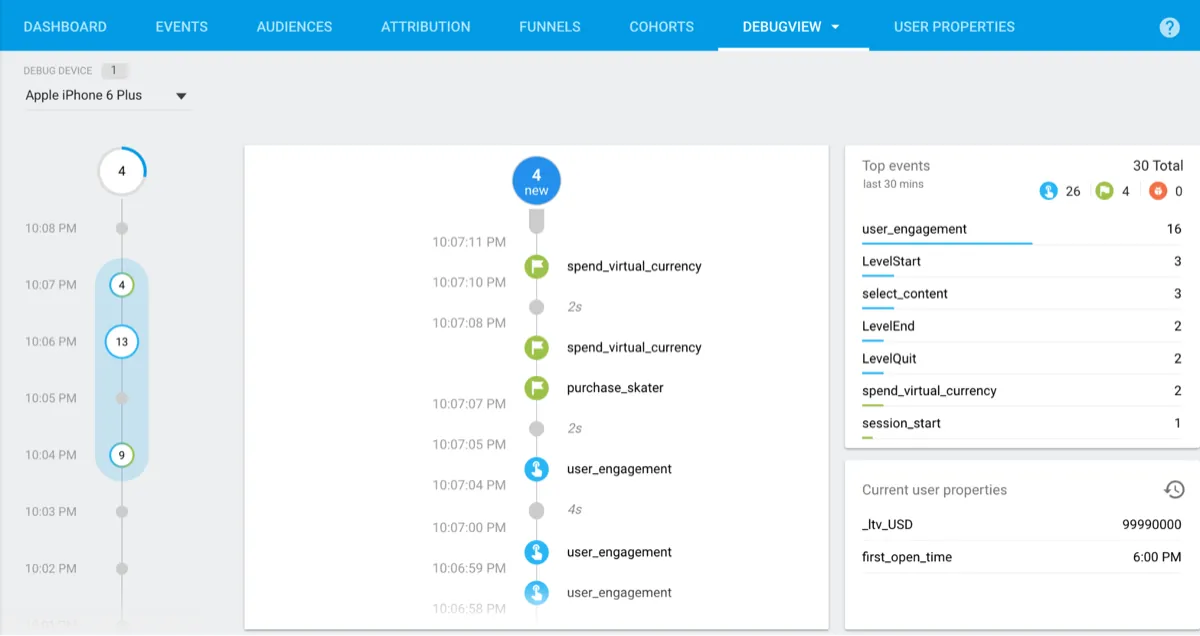
The first public report came from a developer who opened an issue on Firebase's GitHub repository that night. Their app had started crashing at 00:41 UTC on September 29 (5:41 p.m. PDT on the 28th) on four versions already in the App Store, without any new release: 56 crashes for 56 users in the first 18 minutes. They said the app died less than a second after launch, right after the Analytics SDK received a response from Google. Google labeled the issue top priority (P0), and a Firebase team member replied within the hour that the team was investigating.
Google's summary, posted on that issue, is the only explanation it has given: an "incorrectly formatted payload received by the SDK" made apps with Google Analytics for Firebase crash on launch on iOS and Google's other Apple platforms (what Firebase calls iOS+). In plain terms, Google's servers sent the SDK data it couldn't handle. That's why apps crashed even though their developers hadn't changed a thing. Google says it is "actively looking into the root cause" and will explain what caused the incident and how it will prevent a repeat.
The Firebase outage, hour by hour
All times come from Google's own posts on the GitHub issue. PDT is US Pacific time.
| Monday, September 28 (PDT) | UTC | What happened |
|---|---|---|
| 5:41 p.m. | 00:41, Sept. 29 | Apps with Google Analytics for Firebase start crashing on launch |
| 6:54 p.m. | 01:54 | Google says the team is aware and investigating |
| 7:24 p.m. | 02:24 | Google says the problem was identified and rolled back, with the fix rolling out |
| 7:52 p.m. | 02:52 | Fix fully rolled out, per Google's summary |
| 11:52 p.m. | 06:52 | Google says the issue was fully resolved, once cached cases cleared |
The next day, Google's Ads status dashboard, which also covers Google Analytics, logged a Google Analytics outage for the same window, 00:41 to 02:52 UTC on September 29, and marked it resolved.
Is it fixed for users now?
Yes, according to Google. The fix was on Google's side, so your apps didn't need an update. The one catch was caching: Google said some app instances could keep crashing for up to 4 hours after the rollout, until the SDK's next refresh, and that those cases would clear on their own by 11:52 p.m. PDT. On September 29 at 5:30 p.m. PDT, another Firebase team member wrote that Google was "seeing no evidence of ongoing crashes."
Google didn't publish steps for users. If an app still crashes for you, the usual fixes apply:
- Force close it: swipe up from the bottom of the screen and pause to open the app switcher, then swipe the app away. Open it again.
- Check the App Store for an update to that app.
- If it keeps crashing, contact the app's developer. Since Google reports no ongoing crashes from this bug, a crash now probably has a different cause. That's our inference, not something Google said.
The crashes started the same day Apple released iOS 27.0.1, the update that fixed the iPhone 18 Pro Face ID restarts. MacRumors points out that apps were crashing on other iOS versions too, so the timing was a coincidence.
What developers should check
- No Firebase SDK update is needed. Google's summary says so directly: "No SDK updates are required on your end to apply this fix."
- Expect late crash reports. Google warns that "due to crash reporter latency, previous crashes may continue to be reported." If your dashboard still shows new reports, check the crash timestamps against the window above. Google asked developers who still see crashes whether they can reproduce them on a device or only in dashboards, and whether they use Firebase Crashlytics or another crash reporter.
- A more resilient SDK is on the way. A change merged into Google's GoogleUtilities library on September 29 makes it ignore a missing key instead of crashing. Google says it will review and test the SDK changes before release, is also reviewing its server update processes, and will "likely recommend updating" later, without urgency.
- Only Analytics is named. Google's statement names Google Analytics for Firebase and no other product. Crashlytics came up only as a question about crash reporting, not as a cause.
How widespread it was
Google hasn't published a count of affected apps or users. 9to5Google reported that thousands of iPhone apps crashed and that some developers saw tens of thousands of crashes, some far more. We found no app maker who publicly confirmed being hit, so we aren't naming apps.
Bottom line
This was Google's bug, and Google has fixed it: the iPhone apps crash came from bad data its servers sent to the Google Analytics for Firebase SDK, not from your phone or iOS 27.0.1. If an app still won't open, force close it and check for an update. Developers don't need to ship anything now; watch the GitHub issue for Google's root-cause write-up and the hardened SDK. More software news is in our software section.
FAQ
Why did my iPhone apps keep crashing on September 28?
Google says a bug in Google Analytics for Firebase, which many apps include, made them crash on launch after its servers sent the SDK an "incorrectly formatted payload." It started at 5:41 p.m. PDT and was fixed by 7:52 p.m. PDT, with cached cases clearing by 11:52 p.m.
Do I need to update my apps to fix the crash?
No. Google fixed the problem on its servers, so apps recover without an update. If one still crashes, force close it and reopen it, and install any update the App Store offers.
Do developers need to update the Firebase SDK?
Not now. Google says no SDK update is required for the fix. It plans to release a more resilient SDK after testing and expects to recommend it without urgency.